Verify Binarium
Writen By

Online Trading Platform Researcher and Guide Writer
Researches broker platforms and trading account Systems.
Before you can withdraw funds, raise deposit or trading limits, or access all platform features, Binarium requires identity and address checks. Expect to upload a government ID, a selfie or live photo for facial matching, and a recent proof of address; each file must be clear, unedited, and match the name on your account. Common hurdles include expired documents, mismatched details, and low-resolution uploads that delay approvals or trigger rejections. Some payment methods may also require verified status before use or when changing payout details.
Below you’ll find the verification workflow, acceptable document formats, typical processing times, and practical fixes for common rejections. The guidance also explains where to upload documents inside your profile, how to track verification status, and when to contact support. Follow these steps to reduce delays, avoid repeated rejections, and keep your personal data secure during submission so you can access full deposit, withdrawal, and trading functionality.
Below you’ll find the verification workflow, acceptable document formats, typical processing times, and practical fixes for common rejections. The guidance also explains where to upload documents inside your profile, how to track verification status, and when to contact support. Follow these steps to reduce delays, avoid repeated rejections, and keep your personal data secure during submission so you can access full deposit, withdrawal, and trading functionality.
How to Verify Binarium Account
To get verified, we ask you to complete all the fields in the User Profile section (personal information and contacts) and email the documents listed below to [email protected] or upload them in the Verification section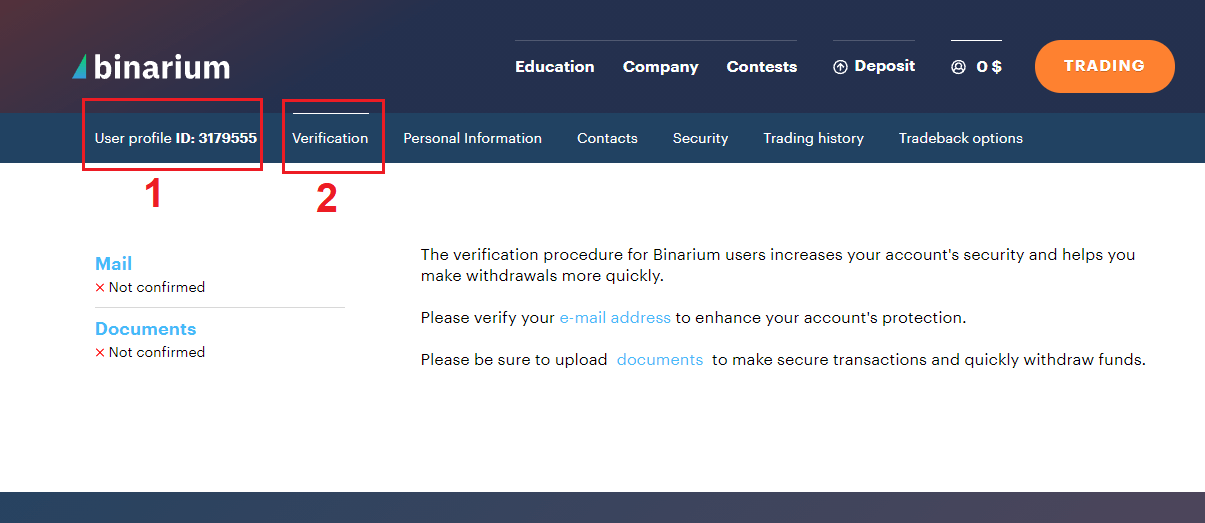
For accounts topped up with VISA, Mastercard and Maestro cards:
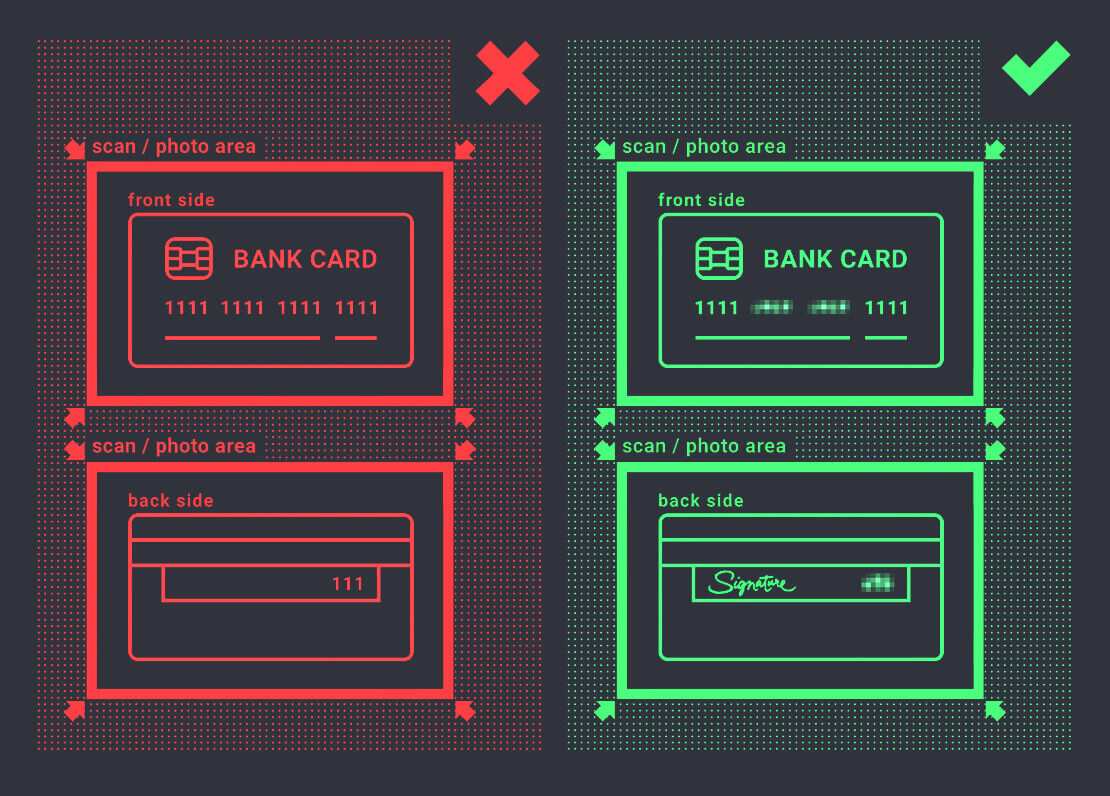
- Bank card scans or high-resolution photos (both sides). Image requirements:
- the first 4 and the last 4 digits of the card number are clearly visible (for example, 1111XXXXXXXX1111); the numbers in the middle must be hidden;
- the card holder first and last names are clearly visible;
- the expiration date is clearly visible;
- the card holder signature is clearly visible;
- the CVV code must be hidden.
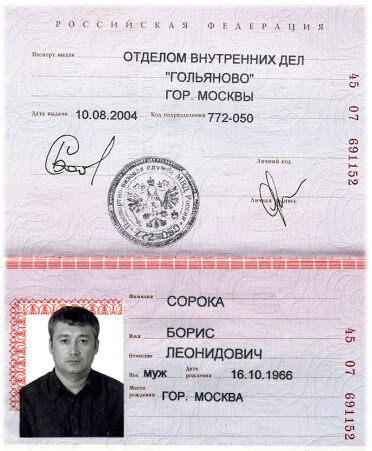
- Card holders passport scan or high-quality photograph of the pages showing personal data, period of validity, country of issue, signature and photo.
- All details, including the passport series and number, must be clearly legible;
- Cropping or editing the image, including concealing part of the details, is forbidden;
- Admissible formats: jpg, png, tiff or pdf; size up to 1Mb.
- Official statement issued by your bank showing the top-up payment to Binarium (digital statements from the bank mobile app are not accepted).
For Qiwi, WebMoney, Yandex.Money e-wallets, and Bitcoin, Ethereum, Litecoin, and Ripple cryptocurrencies
- Card holders passport scan or high-quality photograph of the pages showing personal data, period of validity, country of issue, signature and photo.
- Document or screenshot from the e-wallet showing the top-up payment to Binarium; this document should also reflect all the transactions during the month in which the deposit was made.
Please do not hide or edit any part of scans and photographs except those indicated above.
Third-party funding and withdrawals are prohibited.
Conclusion: Secure Your Trading Experience on Binarium
Verifying your Binarium account is a simple yet essential step to ensure a secure and hassle-free trading experience. It protects your funds, enables seamless withdrawals, and enhances account security. By completing the verification process promptly, you can trade with confidence and access all the platform’s features without restrictions.
FAQs
You must upload a government-issued photo ID (passport, national ID, or driver’s license), a recent proof of address (utility bill or bank statement), and a selfie or live-photo for facial matching. Files should be clear, unedited, and meet the platform’s format and size limits; keep originals in case support requests them.
Most verifications are processed within 24 to 72 hours, but peak times or additional checks can extend that to several business days. Once approved, withdrawal and payment limits tied to verification are usually lifted within the same day. If processing exceeds the expected window, check in-account messages and contact support with your submission reference.
Common reasons include mismatched names, expired documents, low-resolution or cropped images, visible edits or watermarks, and unclear address details. To resubmit, read the rejection reason in your profile, retake photos in good lighting, ensure names and addresses match exactly, and upload unedited originals via the verification page. If problems persist, contact support and provide the rejection reference for specific guidance.
You can usually deposit funds and access basic trading features prior to full verification, but withdrawals, higher deposit options, and certain payment providers may be blocked until approval. Treat unverified access as limited and complete verification before making large deposits or relying on quick withdrawals.
Submitted documents are handled over encrypted channels and accessed by compliance teams only, but you should still upload files through your authenticated account (not email), use strong passwords and two-factor authentication if available, and avoid sharing unnecessary sensitive numbers. Keep originals, monitor account activity, and contact support immediately if you suspect misuse.